

If the extra links beneath your business's Google result look wrong, ask your SEO person to identify each destination before changing the website. A useful page can belong in search even when you would prefer a different shortcut beneath your main result. Agree the customer problem and the page decision before approving removal work.
For an Australian service business, the concern might be an old promotion, an unclear service label or a page customers still need. Those situations deserve different responses. Start with the result you observed and the information each linked page provides today.
Google's sitelinks guidance says these organic shortcuts are selected automatically. Owners can improve the site's information and structure, but cannot choose a promised set or order. A proposal should explain the website work it can deliver and how the later search display will be observed.
Keep two decisions visible: what should happen to the page, and what you hope Google will show. Approve the first using evidence; record the second as an observation to follow up.
Identify the Links You Mean
Keep a screenshot showing the whole result, the search wording and the extra links. Note the date, device and country context. Open each relevant shortcut and record the address reached, including an unexpected redirect. Avoid cropping away the information needed to recognise the feature.
This guide concerns organic links grouped beneath a normal web result. If the links appear in an advertisement or the issue is a Business Profile website button, give that example to the person managing the relevant account. An organic sitelink review does not authorise account changes.
Also separate a shortcut's destination from other result details. The site-name guide covers the source identity above the result. If the main linked heading differs, compare the page title and heading. Mark which part is confusing before asking for a sitewide correction.
Decide Whether the Destination Still Helps Customers
For each affected URL, write a sentence explaining its present purpose. Who needs it, what can they learn and what should they do next? Check the actual page, rather than inferring its purpose from a short search label.
A historical project, customer instruction page or current repair service may still be useful. A discontinued promotion advertising an expired offer needs a business decision about the content. An unfamiliar URL might turn out to be the correct destination with a poor label.
Use a short review record to prevent a preferred search layout from becoming an accidental page-removal instruction:
| Observation | Question to Resolve | Work to Consider |
|---|---|---|
| Useful page, unclear label | Does the page explain a distinct current purpose? | Review its title, heading and relevant link wording. |
| Expired offer | Does anyone still need information at this address? | Agree accurate retained information or a separate retirement plan. |
| Unexpected destination | What happens between the shown URL and final page? | Investigate the address behaviour before rewriting labels. |
| Accurate shortcut, different preference | Is there an identified customer problem? | Record the preference and consider observation without an edit. |
Mark an unanswered question as unresolved. Name the person who can settle it. If the reviewer cannot inspect a destination, the proposal should retain that gap rather than treat the page as disposable.
Review the Website Routes and Wording
Google recommends clear, compact titles and headings, sensible site organisation, relevant links to important pages and concise link text. It also advises avoiding repetitive content. These are useful review areas, without establishing the cause of one observed result.
Ask your provider to show the affected page alongside the routes leading to it. Do menu choices, service-overview links and relevant articles describe its content accurately? Does another page use almost the same label for a different task? Request specific examples before approving broad navigation changes.
Google's link guidance explains that crawlable links generally use an HTML anchor with an address, and that descriptive link text helps people and Google understand the destination. The implementer can inspect those details. The owner should confirm the real services and customer routes.
Use the website menu planning guide if those routes need rethinking. Adding the same keyword link everywhere solely to pursue a preferred sitelink is not a useful content brief. Agree where a link helps the reader and what its destination should explain.
Understand What Removing a Page From Search Means
Google's sitelinks documentation mentions removing a page or using noindex when a sitelink needs removal. Consider the effect on the whole page before approving either approach.
The separate noindex documentation explains that, after Google crawls and processes the rule, the page is excluded from Google Search. Google must be able to access the page to discover that rule. This is broader than hiding one shortcut under one result.
Ask whether the page should remain discoverable for its own customer need. If it should, explain why removing it from search would be appropriate. A preference for a tidier result does not establish that case.
Where a service has ended, use a service-page retirement review to decide what information and address behaviour remain useful. Keep deletion, redirects and indexing instructions outside a cosmetic wording approval unless their exact effects have been agreed.
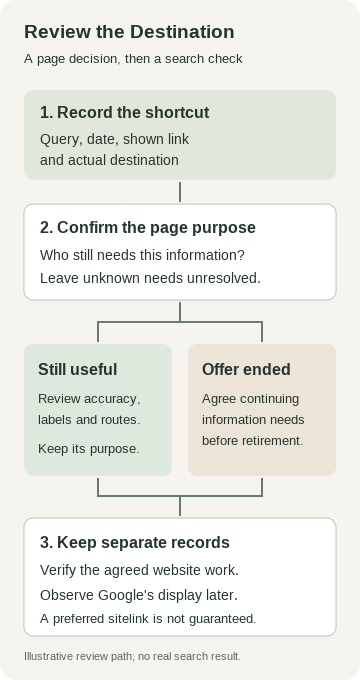
A Worked Example: Repairs and an Expired Offer
This is a hypothetical decision exercise, not an AWE client or measured search result.
Example Heating sees Repairs and a previous winter promotion beneath its main result. The owner would prefer Installations and Contact. The repair page still explains work the business provides and receives relevant customer interest in this example. The promotion page advertises terms that have ended.
The reviewer records two separate decisions. Repairs remains a current service page. Its wording and relevant routes can be checked without instructing anyone to exclude it from search. The owner confirms the promotion has expired, but has not yet decided whether existing customers need its terms.
The promotion's future remains unresolved. The provider proposes accurate wording about the expired offer for owner approval, then asks who can confirm the continuing information need before any retirement instruction. There is no automatic redirect to Installations, whose purpose differs.
The record names the proposed website edits, approval owner and later search check. Even if those edits are completed correctly, the requested Installations and Contact shortcuts remain a preference. The provider cannot mark that display as delivered without observing it, or promise it will be selected.
Agree the Work and Follow-Up Evidence
Ask the quote to identify the reviewed URLs, findings, exact proposed edits and checks. Include the affected shared menus or templates where relevant. Confirm who approves business facts and what will be restored if an implementation needs reversal.
Keep these completion records separate:
- Website work: the agreed public wording, links and address behaviour were checked after implementation.
- Search observation: a dated query and screenshot show what Google displayed under the recorded conditions.
- Business outcomes: suitable enquiries and accepted work have their own evidence and attribution limits.
Agree a follow-up date as a review appointment, not a Google deadline. If the display differs at that check, record it and ask whether new evidence supports further work. Avoid repeatedly changing accurate pages merely to chase a particular arrangement.
To discuss an investigation with an Australian SEO agency, bring the result example and the affected page list. Contact Australian Web Experts to agree the review, implementation and follow-up scope; confirm what your proposal includes before work starts.