

Before paying to clear meta-description warnings, ask which pages are affected and what each proposed edit will improve. Approve a relevant summary of the actual page, with the business facts checked. A shorter description or a green audit indicator does not establish that customers will see the wording you approved in Google.
For an Australian service business, the work might correct an old offer, distinguish two genuine services or add a missing summary to an important page. Those are concrete tasks. A list of missing, repeated or long descriptions needs that context before it becomes a bulk rewriting job.
Keep the original report, the current public description and the proposed wording together. Ask for a reason beside each change, including a decision to leave accurate wording alone.
Verify the website description and the later search snippet separately. A saved field or preview does not establish both.
Identify the Field and the Warning
A meta description is page metadata containing a summary of that page. MDN's metadata reference describes the description field. Ask your provider to inspect what the published page supplies, rather than relying only on an editor's saved setting.
Also identify the part of the search result being discussed. This guide concerns the descriptive snippet, rather than the main linked title. If the concern is that heading, use the page-title review guide to compare it with the page's title and heading information.
Request the exact page addresses and the crawl date. Ask what the tool means by each warning. A repeated description across several pages is different from an empty field or wording that is simply longer than the tool's preferred range.
Use the warning as a starting question:
| Report Finding | Question to Resolve | Work to Consider |
|---|---|---|
| Missing description | What does this page explain, and is it a priority page? | Prepare an accurate summary for the agreed scope. |
| Repeated across pages | Do the pages serve different customer needs? | Write relevant page summaries after confirming their purposes. |
| Length warning | Is important meaning unclear or unnecessarily wordy? | Review clarity before cutting to a tool's preferred count. |
| Outdated promise | Where does that claim appear, and what is correct now? | Confirm the fact and agree all affected wording separately. |
Mark pages whose purpose or facts cannot yet be confirmed as unresolved. A writer should not invent an offer merely to fill a blank field.
Compare the Page With Any Observed Snippet
Google's snippet guidance explains that snippets are generated automatically, primarily from page content. Google may use the meta description when it provides a better summary. Different searches can produce different snippets for the same page.
If the owner has seen confusing wording, keep the query, observation date, page destination, device and country context. Retain enough of the result to identify the description being discussed. Then compare it with the current description and relevant page passages.
An old availability claim might still be in the page body. Rewriting only the metadata would leave that public statement in place. Ask the provider to identify the actual locations requiring correction and the person who can approve the new fact. If its source cannot be established, retain that uncertainty instead of declaring the entire issue fixed.
Keep accurate page information intact. A different search extract does not by itself show that the existing description is defective. The review should explain whether the problem is missing metadata, an unclear summary, inaccurate content or an observation that needs follow-up.
Agree Useful Summaries and a Defined Page List
Google recommends descriptions that accurately summarise individual pages, and suggests prioritising important URLs where creating every description is impractical. Ask the provider to explain its proposed page order using your actual services and available evidence.
For each selected page, confirm the customer task and the useful distinction. A repair page should describe the repair work it explains. A cleaning page should reflect that service. Avoid adding unsupported coverage, urgent attendance, prices or response times merely to make the wording sound more attractive.
Google does not specify a maximum meta-description length; displayed snippets are shortened as needed, typically to fit the device width. A provider can use an editing target, but should explain it as a working preference. A character count cannot guarantee the entire wording will appear in every result.
Ask for the current description, proposed replacement and reason in one review record. Include the page URL and a fact approver. If shared templates generate the wording, request the affected page set and exceptions before approving a pattern change.
Where a page needs a fuller rewrite, use the content-refresh review to scope it separately. For new factual input, the SEO content buying guide explains what the business needs to supply and check.
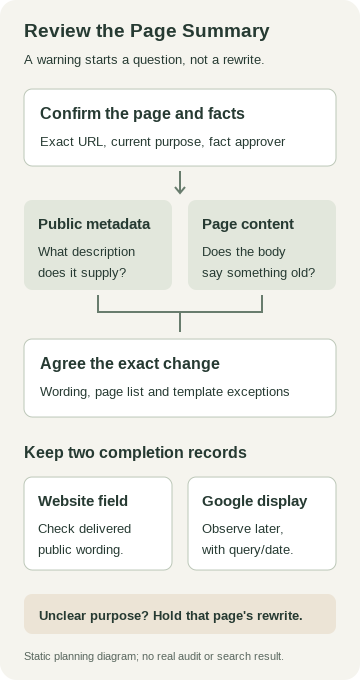
A Worked Example: Repairs and Cleaning Pages
This is a hypothetical approval exercise, not an AWE client, live metadata audit or measured search result.
Example Pool Care has pump-repair and pool-cleaning pages using the same general business summary. The owner confirms that both services are current, but their customer questions and enquiry details differ. The provider proposes one relevant summary for each page, using the approved information already explained there.
The owner also notices that an old description promises weekend attendance. The team must establish which page or shared setting supplies that statement and confirm the current arrangement. They do not carry the promise into the new summaries because it sounds persuasive.
A third page labelled Maintenance has an unclear purpose in the proposal. Nobody has confirmed whether it describes ongoing cleaning, equipment servicing or a combined offer. Its rewrite remains unresolved until the business settles that question. Choosing different keywords would not supply the missing decision.
The agreed record can therefore contain two proposed summaries, a separate investigation of the old attendance claim and a held page. It supplies no finished descriptions, public implementation or Google-display outcome. Each completed task will need its own evidence.
Check the Public Implementation and Follow Up
After the approved change, ask the website person to inspect the delivered description at each agreed URL. Check that the correct page summary appears and that any shared pattern has preserved its exceptions. If body text was also authorised, verify those passages as separate changes.
Keep the earlier report and the new verification date. A later tool run can show whether its own warnings remain, but an old crawl does not establish the current public version. Likewise, an editor preview is useful working material without proving the public output.
An authorised Search Console user may consider an appropriate recrawl request. Google's recrawl guidance says a request does not guarantee immediate inclusion, or inclusion at all. Repeated requests for the same address do not make crawling faster.
Agree a later observation date as a review plan. Record what Google shows under the conditions observed, including a different snippet or no result found. Do not fill that field with the description you hoped would appear.
Put the approved page list, actual changes, checks and unresolved questions in the SEO change log. Search clicks, suitable enquiries and paid work need separate records and attribution; a corrected metadata field does not establish those outcomes.
When discussing work with an Australian SEO agency, bring the warning list and the page purposes you can confirm. Contact Australian Web Experts to agree the investigation, writing, implementation and follow-up scope before work begins.