

Start with the problem you can show, then choose the amount of work needed to solve it. A dated website can still have useful pages and a working enquiry path. A good-looking site can still explain the wrong services or make it hard to contact you.
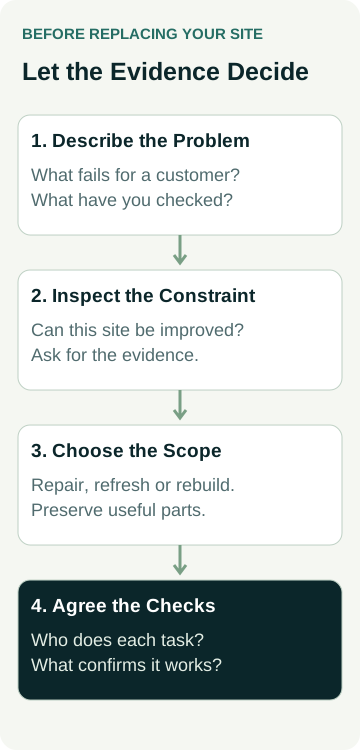
Before paying for a rebuild, separate three choices: repair a specific fault, refresh the content and presentation, or replace the underlying site. Ask a designer to explain which problem each proposed change solves and what can stay.
This guide is for Australian small service businesses with an existing website. It helps you decide what to discuss before requesting a scope. It does not assume that a new design will produce more enquiries.
You do not need to choose the technical solution yourself. Bring the website address, the jobs you want and examples of what is going wrong. Ask for a recommendation that explains the evidence, the limits and the work to preserve.
Name the Business Problem Before the Design Problem
“The site feels old” is a useful starting observation. It needs a more specific question before it becomes a build brief.
Write down what a potential customer should be able to do. For a repair business, that might mean confirming the type of repair, checking the actual service area and calling or sending a request. Then look for the point where the current site makes that difficult.
Use a few concrete observations:
- The homepage still promotes a service you stopped offering.
- The main service page does not explain which jobs you take on.
- The phone link is difficult to find or does not work on a phone.
- The enquiry form displays a confirmation, but an agreed test does not arrive.
- You cannot update important information without asking someone else.
Keep observed problems separate from guesses about their cause. Low enquiry numbers do not establish that the design is responsible. There may be too few relevant visitors, unclear services, a contact fault or a mismatch between the enquiries and the work you want.
If search clicks have increased without useful enquiries, our guide to checking the search query mix helps investigate that question. A rebuild will not automatically correct the visitors you attract.
Compare the Three Levels of Work
Agencies use “refresh”, “redesign” and “rebuild” differently. Use the written scope to understand what changes, rather than relying on the label.
| Option | When to discuss it | Evidence to ask for |
|---|---|---|
| Targeted repair | A specific fault stops an otherwise usable site doing its job. | The fault, its likely cause, proposed fix and a check that will confirm it works. |
| Content and design refresh | The site can support your needs, but its wording, proof, navigation or presentation needs improvement. | Pages and shared layouts to change, what stays, who supplies content and how the main customer path will be checked. |
| Rebuild | The existing structure or technology prevents the required improvements, or retaining it creates an unacceptable support burden. | The actual constraint, why it cannot reasonably be fixed, proposed replacement and a plan to preserve useful content and connected services. |
A broken phone link is a reason to repair the link. It does not, on its own, prove that the platform must be replaced. Equally, repeatedly patching a site that cannot support the pages or functions you need may postpone a necessary change.
You can combine the options. An urgent contact fault might need repair now, with a wider refresh planned separately. Ask which changes can be isolated and which depend on replacing the site.
Ask What the Existing Site Can Still Support
Have the person assessing the website show you the constraint in plain language. Can it support clear service pages, a usable phone layout, an enquiry route and the changes you expect to make after launch?
“We prefer another platform” is different from “your current platform cannot do this required job”. Ask whether the difficulty comes from the platform, the way this particular site was built, a missing account permission or the current support arrangement.
If security or support is part of the recommendation, ask which component is affected and what needs attention. Do not assume every old-looking site is unsafe, or that installing a new theme resolves an underlying technical issue.
For content structure, our separate service-page decision guide helps determine whether a service needs its own explanation. More pages are useful when they answer distinct customer questions, rather than simply making a rebuild look larger.
A Worked Example: An Outdated Repair Website
An example appliance repair business has a website promoting both repairs and new appliance sales. It stopped selling appliances two years ago. The owner wants repair enquiries in its confirmed service area.
On a phone, the sales message appears first. The repair page says little about the appliances the business handles. A contact button works, but the owner has not checked form delivery. The site can still be edited and the designer has not identified a structural limitation.
The next decision is to check the contact route and ask for a scoped update to the misleading content, repair information and main navigation. The evidence currently supports investigating a repair and refresh, while the need for a rebuild remains unresolved.
Now change one fact: the person assessing the site demonstrates that essential layouts cannot be changed within the existing build without substantial custom work, and explains the options and support implications. A replacement becomes a reasonable option to compare with retaining the site.
The owner asks for both scopes to show the same business requirement and the complete responsibilities. No enquiry improvement is assumed in either case. The decision depends on the constraint, the work included and what the business can manage afterwards.
Preserve What Already Helps Customers
Before agreeing to replace anything, list the pages, photos, downloads and functions that remain useful. Include page addresses customers have bookmarked or that other sites link to. Ask how important existing content and search landing pages will be assessed before removal.
If page addresses change, Google's site-move guidance recommends mapping old URLs to their new destinations, updating links and monitoring the move. Google also warns that rankings can fluctuate while it recrawls and reindexes changed URLs. A redirect plan is part of the work; it is not a guarantee that traffic stays the same.
List connected systems separately: domain registration, email, booking services, enquiry delivery and measurement. Confirm who will check each dependency. Replacing the website does not mean every connected service must change.
Keep a record of the current important pages and agreed checks before work starts. When a change is proposed, the person doing it should be able to explain what is being preserved, replaced or retired.
Compare the Complete Scope Before Choosing
Ask for a repair or refresh recommendation to identify the pages and faults covered. Ask a rebuild recommendation to explain why retaining the current site is unsuitable. Both should state content responsibilities, ongoing costs, account access, launch checks and support.
Our questions to ask a web designer before accepting a quote cover that comparison in detail. Use the trade website brief to describe the jobs, customers and material you can supply.
Agree on what you will inspect after the work. That includes accurate service information, usable phone navigation and an agreed enquiry-delivery test. Any later review of enquiries should distinguish contact actions from actual useful requests and accepted jobs. A change in appearance is not evidence of a commercial result.
If you are considering a new build, compare AWE's current website packages with the scope you need. To discuss your existing site, contact Australian Web Experts with its address, the main work you want and the problems you have observed. Ask what should be kept and what would justify replacing it before committing to the build.