
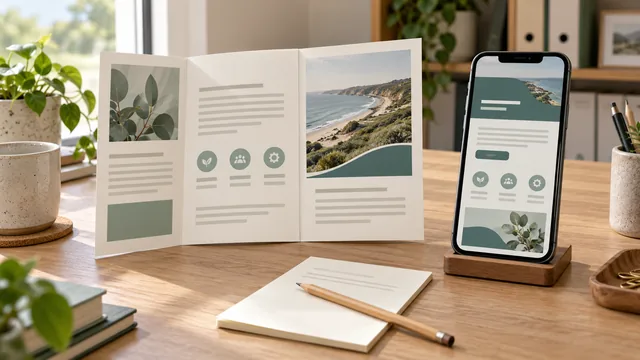
Use a service page to explain the current offer within your website's navigation and enquiry journey. Add a PDF brochure when customers have a practical reason to save, print or share a document. If you publish both, give each version a clear job and name who keeps them consistent.
A brochure designed for a sales meeting may not be the easiest way for a new visitor to check a service on a phone. A website page may not provide the take-away copy a customer needs for an internal discussion. Start with that reading task rather than assuming one format is always better.
For an Australian small business, the important information should be accurate and easy to find whichever route a customer takes. A file upload is not automatically a finished service page, and a new page does not automatically make an old brochure current.
Identify the Reading Task Before Choosing the Format
Write down what the customer needs to understand and do next. They may want to check whether you take a particular job, see your service area, prepare for a quote or pass an explanation to another decision-maker.
Ask where that reading happens. Is the customer browsing the site on a phone, following a link you supplied or keeping a document for a meeting? Consider whether the information changes frequently and whether the customer needs a complete copy to use away from the website.
Keep the online service explanation within a useful route to related information and contact. If a PDF is the only description, check what a visitor sees before opening it. The surrounding page should make the service and file purpose clear, rather than presenting an unexplained download link.
Our one-page or multi-page website guide covers the wider structure. This decision concerns the role of a document alongside that structure, rather than choosing another page count or website platform.
Give the Page and the Document Different Jobs
A current service page can explain the offered work, important exclusions, relevant proof and the next enquiry step. It should help a reader decide whether to contact the business without requiring a brochure download for every basic answer.
A PDF can supply a purposeful take-away version: a printable overview, a document to share with colleagues or a reference the customer wants to retain. Confirm the actual need before commissioning another layout and an ongoing second copy.
Use this comparison in the brief.
| Customer Task | Web Page Role to Consider | PDF Role to Consider |
|---|---|---|
| Check the current service | Explain the offer and related customer questions within the website. | Support the explanation if the document adds something useful. |
| Start an enquiry | Provide a clear current contact route and the information needed to use it. | Include an accurate contact route without making the file the only way forward. |
| Save or share an overview | Give the reader a stable route to the current information. | Provide the agreed take-away content in a usable document. |
| Review a changing detail | Maintain the approved public information and connected links. | Identify the version and update the file when affected facts change. |
The PDF does not have to repeat every word on the page. Agree what is included and why. A brief overview should not omit an important exclusion in a way that makes the service sound broader than it is.
If you are still deciding how to explain different services, use our separate-service-page guide. Creating several brochures does not resolve unclear service scope or duplicate page intent.
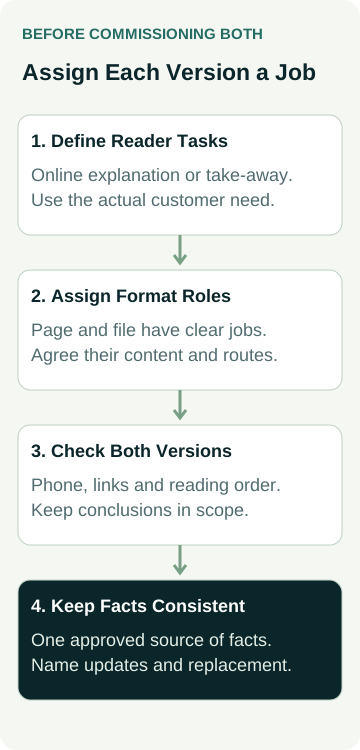
Agree the reader's task, the useful content and the next step for each version before designing the second format.
Check Reading and Contact on the Actual Devices
Open the proposed service page and document on a phone as well as a computer. Can someone read the main explanation, understand a table or image and find the intended contact route? A layout that looks polished at full page size may need repeated zooming on a smaller screen.
GOV.UK's guidance for publishing accessible documents recommends HTML where possible so content can use the reader's browser settings. That is useful context for the format discussion. Assess your actual audience, proposed page and document rather than assuming the file or the page will suit everyone.
PDFs can contain useful structure and links, but those features need attention during preparation. W3C's PDF reading-order technique discusses correct tab and reading order in tagged documents. A visual check alone does not establish that the reading sequence works for someone using assistive technology.
Ask the people producing both versions to explain the checks included and the remaining limitations. Confirm that the document's contact links open the intended route and that any important instruction can be understood in the delivered version. Keep a screenshot, phone view or automated score within the scope it actually tested.
Our website accessibility scope guide helps define the wider review. A good result on the service page should not become an assurance about an unreviewed PDF, and an accessible PDF does not establish the rest of the site's accessibility.
Keep Search Expectations Separate From Format Preference
Google's indexable file-type guidance lists PDF among the document formats it can index. It is therefore inaccurate to dismiss a PDF simply because it is a file. Supported format is not a guarantee that a particular document will be crawled, indexed or ranked.
Ask how a person arriving directly at the document will understand the business and reach current service information. Someone may open an old link without first seeing the website page that introduces the brochure. The document needs enough context for its intended task.
Equally, a web page's existence does not establish search visibility or suitable enquiries. Choose the format for the customer job, then agree any relevant search checks separately. Avoid buying either version on a promise that changing format alone will improve rankings or sales.
A Worked Example: A Commercial Cleaning Overview
This business and proposed material are illustrative, not an AWE client or a measured result.
Example Cleaning explains its current commercial cleaning work on a service page. A facilities manager needs to check the scope and request a discussion about a site. The page provides that information and the current enquiry route.
The manager also wants an overview to share at an internal meeting. The owner considers a PDF covering the agreed service summary, how the initial discussion works and suitable evidence the business has permission to use. That document has a defined sharing purpose; it is not a substitute for every current detail on the page.
The owner assigns one person to confirm the facts for both versions. When the business changes the work it takes, that person identifies the affected page wording, brochure section and download link. The website editor and document producer then receive the same approved information.
The PDF can refer readers to the website for current details, but that does not excuse an inaccurate claim inside the file. A saved copy may continue circulating after the website has changed. The update plan should recognise that limitation rather than promise that all previously shared copies can be recalled.
Agree the Update and Replacement Work
Name the approved source for service facts and who can authorise a correction. Include contact details, service scope, exclusions and any other information used in both places. A designer should not have to guess which version contains the business's latest decision.
Ask what is included when the PDF changes. Does someone update the source document, export the new file, check it and replace the correct website link? Who confirms that the page and download still agree? A one-off design fee may not include that continuing work; compare the actual proposal.
Use a sensible title and version information for a document intended to be retained. Make the download link describe the file clearly, so a reader understands what they will open. If the version is being replaced, ask the website owner to review old links and the behaviour of the previous address before removing anything.
If a document is no longer appropriate, agree its retirement as a specific task. Do not assume that hiding the menu link removes every old file address or every saved copy. Keep an accurate record of the change and what remains outside the business's control.
Put Both Roles Into the Website Brief
Describe the current online explanation, any take-away document, the material you can supply and the checks you expect. Separate writing, design, export, website placement and later corrections so the proposal covers the actual deliverables.
Our trade website brief helps organise the broader build. If you need help writing the service information, our SEO content buying guide covers how the writer gathers business facts and checks claims. Format selection does not replace that work.
After publication, verify the page, delivered file and relevant links before assessing any business outcome. A working download shows that the file can be reached. It does not establish that customers read it, that enquiries were suitable or that revenue increased.
Compare AWE's current website packages, or talk to Matt with the service explanation and the reason customers need a separate document. Agree the page and PDF roles, facts, checks and update responsibility before commissioning both.